
Water Simulator Flood Everything Dig So the Water Follows
Trenches, moats, canyons, and mud walls: the shovel is how you aim a flood without buying Admin.
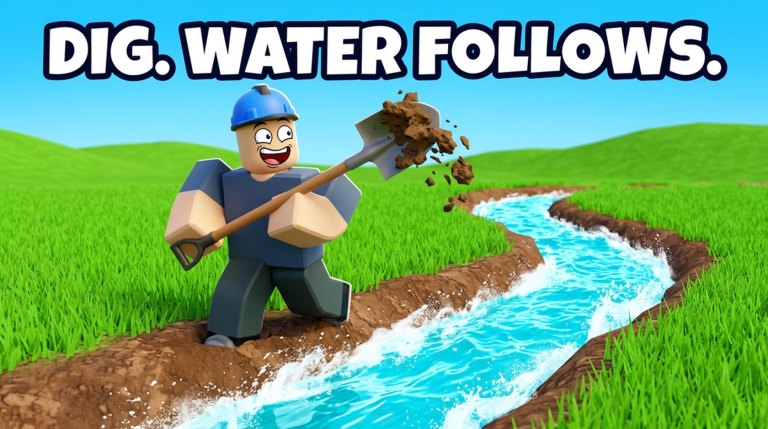
The marketing line for Water Simulator Flood Everything is the whole tutorial: dig, and water follows. The hose paints volume. The shovel aims it. On a six-player Roblox valley that means every trench you cut is a river someone else can steal, and every moat you dig is a house you decided to keep. This page is the terrain craft. Gadget names live on the tools hub. Geography lives on the valley map.
You do not need Mega Tools to learn this. A default shovel already rewrites the heightmap. Mega only makes the brush larger, which matters when five other people keep refilling the ditch you just opened.
Why water follows
The solver fills the next lower cell. A puddle on flat grass sits there looking pretty until it finds a lip. Cut a trench out of that puddle and the volume occupies the new channel instead of waiting for evaporation. That is the trick. You are not drawing a blue decal. You are changing the lowest path.
Aim the first cut downhill. A trench that runs along a contour line just becomes a long pond. A trench that points at town becomes a canal. Check the map so you know which way town actually is; new players dig toward the volcano and wonder why the street stayed dry.
Trenches and canals
A working canal has three jobs: collect, carry, and dump.
- Collect at a high pond, a lake behind the dam, or a hose pour at the ridge.
- Carry through dirt you actually cut, wide enough that the volume does not jump the bank.
- Dump into the street, plaza, or crater you wanted wet.
Start shallow. A ten-step test trench teaches flow speed without wrecking the spawn lawn. Widen if water backs up. Deepen if it leaps. Bank one side with mud so the stream stays in the cut. Then pour at the high end, not in the middle — pouring mid-canal just makes a bulge that spills sideways.
When you are ready for a full-map dump, the same craft aims a dam break. Cut a canyon under the spillway so the reservoir has a chosen street instead of a random plaza. That is also how new players accidentally wipe town, so read how to flood before you tunnel the crest.
Moats and protection
A moat is a trench that goes around a house instead of through it. Water that would have entered the doorway falls into the ring and continues down the road. Pair it with a mud lip on the uphill side so a shallow canal cannot jump the ring.
Moats lose to a named Tsunami, a Mega Bomb crater, and a full reservoir dump. They win against a default hose and against a neighbor who is flooding the next street for a boat ride. Say the plan in chat. A surprise moat that steals someone else’s canal is still legal physics; it is also how six-player arguments start.
Acid changes the math. An Acid hose will eat the moat walls and the house. Do not spend five minutes on a ring if a chemist is already spraying green. Details on that tank sit on fluids.
Canyons, bombs, and Mega shovel
Canyons are deep trenches. Use them when you want a gorge the hose cannot jump, or when you want the dam dump to fall as a waterfall instead of a sheet. Bombs speed the work: a doorway charge opens a room, a Mega Tools bomb opens a crater lake. Dig the lip after the blast so the new pit drains where you chose.
Mega Tools (149 Robux, 14 November 2026) enlarges shovel and mud. Buy it if canal work is the session you actually play. Skip it if you only log in for VIP dailies. Ranked tool takes live on the tools tier list.
Flying helps you see whether a canyon is actually pointing at town. Take off, look down the cut, land, then fix the kink. Binds are on controls and the Flying page.
Mud is the counter-shovel
Mud packs volume back onto the heightmap. Use it to:
- Stop a shallow flood across a street.
- Pinch a river into a slide.
- Raise a ramp for vehicles.
- Close a spillway you opened by mistake.
Mud loses to Acid and to events. It wins the everyday hose war. Geysers and whirlpools from the official description are terrain gizmos: place, test with a small pour, then commit.
A shovel-first session
- Equip shovel, not hose. Cut a ten-step downhill trench from a puddle.
- Switch to water and pour only at the high end.
- Bank one side with mud. Watch the jump points and patch them.
- Dig a moat around one house. Prove you can keep a doorway dry.
- If the lobby wants spectacle, aim a canyon at the dam, then follow the flood guide.
- Reset when lava or Acid has turned the cut into rock or a hole with no floor.
Stars from quests still unlock extra gadgets on a track. The shovel you spawn with is already enough to redirect a river. Codes do not grant a better dig as of November 2026; see codes. After an [UPD] shutdown, test one trench before you assume flow speed stayed the same, then check updates.
Frequently Asked Questions
Quick answers to the most common questions.
Does water really follow where I dig?
Yes. The solver occupies the next lower cell. A trench from a puddle becomes a canal; a contour-line ditch becomes a long pond.
What should I dig first as a new player?
A short downhill trench from a high puddle toward a low street. Save dam canyons until the lobby agrees. See getting started.
Can a moat save a house from a dam break?
No. A moat stops a hose canal. A reservoir dump or Tsunami overruns street rings. Move uphill or Reset.
Do I need Mega Tools to dig well?
No. Mega only enlarges the brush. The default shovel already aims floods. Buy Mega if canal work is your whole session.
How do bombs fit with digging?
Bombs punch pits; the shovel shapes the lip so the pit drains where you chose. Mega Bomb is an event crater, not a garden tool.